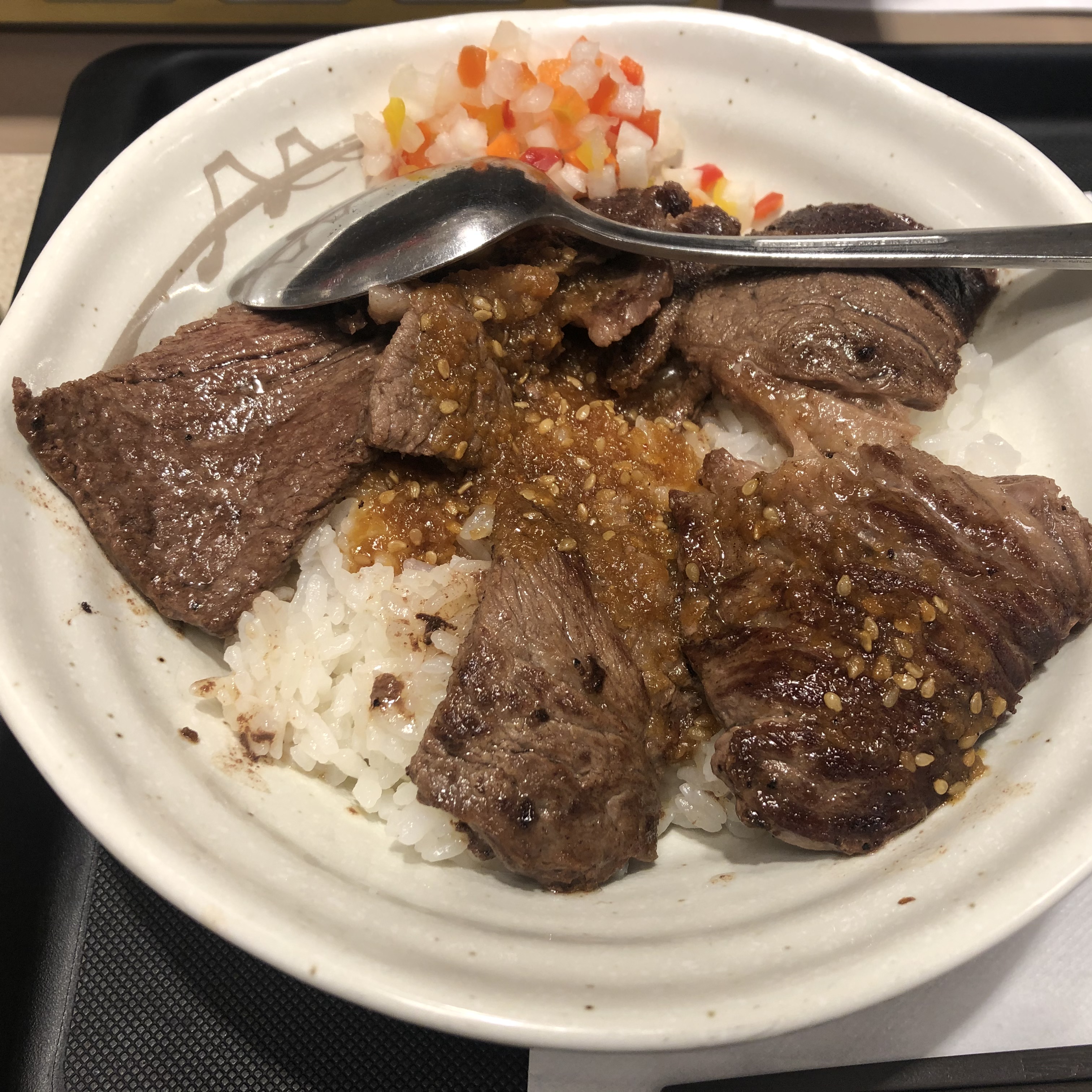
今日のランチは、松屋で、和風ステーキ丼。
メニューの見た目と、出てきたものにかなりの乖離がある。とにかく盛り付けが汚い。味は、というと、美味しくない。まぁ、750円くらいだったので、期待はしていなかったけれど、思った以上にペラペラな肉。ステーキというよりも焼肉といった方がいいような感じ。タレも不均等にかかっているので、肉にタレがかかっていないところもあり、それも厳しい。これならば、牛丼にサイドをつけた方がよかった。牛丼以外は、やっぱきつい。
今日のランチは、松屋で、和風ステーキ丼。
メニューの見た目と、出てきたものにかなりの乖離がある。とにかく盛り付けが汚い。味は、というと、美味しくない。まぁ、750円くらいだったので、期待はしていなかったけれど、思った以上にペラペラな肉。ステーキというよりも焼肉といった方がいいような感じ。タレも不均等にかかっているので、肉にタレがかかっていないところもあり、それも厳しい。これならば、牛丼にサイドをつけた方がよかった。牛丼以外は、やっぱきつい。
Windows 10 Ver.20H2のIMEの予測変換がかなりひどいので、オフにしてみる。Ver.2004でもひどかったが、20H2はさらにひどい。IMEは止め時なのかもしれないが、選択肢がほぼないので、オフにして様子を見る。
これで、予測入力は使えなくなるが、誤変換や勝手に選択される問題もなくなる。
Ubuntu 18.04で、PHPをPHP7.2からPHP7.4にアップデートしたところ、作業後にOSを再起動したら、Nginxが起動しなくなった。原因を調べて対処したので、メモを残す。
Nginxのステータスを確認したところ。
ubuntu@ip-10-0-0-122:/etc/nginx$ sudo service nginx status
● nginx.service - A high performance web server and a reverse proxy server
   Loaded: loaded (/lib/systemd/system/nginx.service; enabled; vendor preset: enabled)
   Active: failed (Result: exit-code) since Wed 2020-10-14 22:35:23 PDT; 5s ago
     Docs: man:nginx(8)
  Process: 1296 ExecStartPre=/usr/sbin/nginx -t -q -g daemon on; master_process on; (code=exited, status=1/FAILURE)
Oct 14 22:35:23 ip-10-0-0-122 systemd[1]: Starting A high performance web server and a reverse proxy server...
Oct 14 22:35:23 ip-10-0-0-122 nginx[1296]: nginx: [emerg] "try_files" directive is duplicate in /etc/nginx/sites-enabled
Oct 14 22:35:23 ip-10-0-0-122 nginx[1296]: nginx: configuration file /etc/nginx/nginx.conf test failed
Oct 14 22:35:23 ip-10-0-0-122 systemd[1]: nginx.service: Control process exited, code=exited status=1
Oct 14 22:35:23 ip-10-0-0-122 systemd[1]: nginx.service: Failed with result 'exit-code'.
Oct 14 22:35:23 ip-10-0-0-122 systemd[1]: Failed to start A high performance web server and a reverse proxy server.
ubuntu@ip-10-0-0-122:/etc/nginx$
PHP7.4にアップデートしたタイミングで、Apacheがインストールされて、これが自動起動しており、Nginxと、ポート80の使用が競合して、Nginxが落ちていた。apache2の自動起動を停止する。
sudo systemctl disable apache2
それでも、まだ、Nginxの起動でエラーになる。ログを見ると、コンフィグの問題のようなので、configtestを実施し、見事にエラーになる。
ubuntu@ip-10-0-0-122:/etc/nginx/sites-available$ sudo service nginx configtest
 * Testing nginx configuration                                                                                   [fail]
ubuntu@ip-10-0-0-122:/etc/nginx/sites-available$
Nginxのコンフィグのdefaultで、php7.2-fpmの部分を、php7.4-fpmのsockに書き換え。
その後、Nginxの起動を試すが失敗。Nginxのコンフィグチェックを行って、エラーになっている行を特定。
sudo nginx -t
nginx: [emerg] "try_files" directive is duplicate in /etc/nginx/sites-enabled/default:77
nginx: configuration file /etc/nginx/nginx.conf test failed
“try_files” がダブっているというので、場所を確認して、変更した。なぜ、急にエラーになったのか、はあるが、とりあえず、スルー。修正後は、Nginxが無事に起動した。
最初のStatusのログをみると、最初から”try_files ”が問題って書いてあった。おちついて、見る必要あり。
Windows 10 October 2020 Update (Ver 20H2)が配信されたので、早速、VAIOにWindows 10に適用した。とりあえず、動作に問題はなし。
春のとき(Ver 2004)に廃止されていた大型アップデートを遅らせるためのGUIの画面は復活せず。それは、もう、グループポリシーで設定するしかないようだ。
あと、Ver.20H2にすることで、EdgeがChromiumベースのEdgeに置き換わった。なので、個別にアップデートをしなくても、October 2020 Updateを入れるだけで、Edgeの更新ができる。これは管理する側からすると楽。
バージョンは、今回は20H2となっている。これは、全部数字にすると、2010になるので、紛らわしくなるので、変えたとのこと。
Ubuntu 18.04のPHPをPHP7.2からPHP7.4に上げた。PHPを使っているのは、Wordpress。そのメモ。でも、途中が消えてる気がする、というか消えてる。
ubuntu@ip-10-0-0-122:~$ php -v
PHP 7.2.24-0ubuntu0.18.04.7 (cli) (built: Oct  7 2020 15:24:25) ( NTS )
Copyright (c) 1997-2018 The PHP Group
Zend Engine v3.2.0, Copyright (c) 1998-2018 Zend Technologies
    with Zend OPcache v7.2.24-0ubuntu0.18.04.7, Copyright (c) 1999-2018, by Zend Technologies
ubuntu@ip-10-0-0-122:~$
ubuntu@ip-10-0-0-122:~$ sudo apt install software-properties-common
Reading package lists... Done
Building dependency tree
Reading state information... Done
software-properties-common is already the newest version (0.96.24.32.14).
software-properties-common set to manually installed.
The following packages were automatically installed and are no longer required:
  libdumbnet1 libnginx-mod-http-geoip libnginx-mod-http-image-filter libnginx-mod-http-xslt-filter libnginx-mod-mail
  libnginx-mod-stream linux-aws-5.3-headers-5.3.0-1017 linux-aws-5.3-headers-5.3.0-1019
  linux-aws-5.3-headers-5.3.0-1023 linux-aws-5.3-headers-5.3.0-1028 linux-aws-5.3-headers-5.3.0-1030
  linux-aws-5.3-headers-5.3.0-1032 linux-aws-5.3-headers-5.3.0-1033 linux-aws-5.3-headers-5.3.0-1034
  linux-aws-5.3-headers-5.3.0-1035 linux-aws-headers-4.15.0-1041 linux-aws-headers-4.15.0-1043
  linux-aws-headers-4.15.0-1044 linux-aws-headers-4.15.0-1045 linux-aws-headers-4.15.0-1047
  linux-aws-headers-4.15.0-1048 linux-aws-headers-4.15.0-1050 linux-aws-headers-4.15.0-1052
  linux-aws-headers-4.15.0-1054 linux-aws-headers-4.15.0-1056 linux-aws-headers-4.15.0-1057
  linux-aws-headers-4.15.0-1058 linux-aws-headers-4.15.0-1060 linux-aws-headers-4.15.0-1063
  linux-aws-headers-4.15.0-1065 linux-headers-5.3.0-1035-aws linux-image-5.3.0-1035-aws linux-modules-5.3.0-1035-aws
  nginx-common nginx-core
Use 'sudo apt autoremove' to remove them.
0 upgraded, 0 newly installed, 0 to remove and 0 not upgraded.
ubuntu@ip-10-0-0-122:~$
ubuntu@ip-10-0-0-122:~$
ubuntu@ip-10-0-0-122:~$
ubuntu@ip-10-0-0-122:~$ sudo add-apt-repository ppa:ondrej/php
 Co-installable PHP versions: PHP 5.6, PHP 7.x and most requested extensions are included. Only Supported Versions of PHP (http://php.net/supported-versions.php) for Supported Ubuntu Releases (https://wiki.ubuntu.com/Releases) are provided. Don't ask for end-of-life PHP versions or Ubuntu release, they won't be provided.
Debian oldstable and stable packages are provided as well: https://deb.sury.org/#debian-dpa
You can get more information about the packages at https://deb.sury.org
IMPORTANT: The -backports is now required on older Ubuntu releases.
BUGS&FEATURES: This PPA now has a issue tracker:
https://deb.sury.org/#bug-reporting
CAVEATS:
1. If you are using php-gearman, you need to add ppa:ondrej/pkg-gearman
2. If you are using apache2, you are advised to add ppa:ondrej/apache2
3. If you are using nginx, you are advised to add ppa:ondrej/nginx-mainline
   or ppa:ondrej/nginx
PLEASE READ: If you like my work and want to give me a little motivation, please consider donating regularly: https://donate.sury.org/
WARNING: add-apt-repository is broken with non-UTF-8 locales, see
https://github.com/oerdnj/deb.sury.org/issues/56 for workaround:
# LC_ALL=C.UTF-8 add-apt-repository ppa:ondrej/php
 More info: https://launchpad.net/~ondrej/+archive/ubuntu/php
Press [ENTER] to continue or Ctrl-c to cancel adding it.
Hit:1 http://us-east-1.ec2.archive.ubuntu.com/ubuntu bionic InRelease
Get:2 http://us-east-1.ec2.archive.ubuntu.com/ubuntu bionic-updates InRelease [88.7 kB]
Get:3 http://us-east-1.ec2.archive.ubuntu.com/ubuntu bionic-backports InRelease [74.6 kB]
Get:4 http://ppa.launchpad.net/ondrej/php/ubuntu bionic InRelease [20.8 kB]
Get:5 http://security.ubuntu.com/ubuntu bionic-security InRelease [88.7 kB]
Get:6 http://ppa.launchpad.net/ondrej/php/ubuntu bionic/main amd64 Packages [71.9 kB]
Get:7 http://ppa.launchpad.net/ondrej/php/ubuntu bionic/main Translation-en [29.5 kB]
Fetched 374 kB in 1s (398 kB/s)
Reading package lists... Done
ubuntu@ip-10-0-0-122:~$
ubuntu@ip-10-0-0-122:~$
ubuntu@ip-10-0-0-122:~$ sudo apt update
Hit:1 http://us-east-1.ec2.archive.ubuntu.com/ubuntu bionic InRelease
Get:2 http://us-east-1.ec2.archive.ubuntu.com/ubuntu bionic-updates InRelease [88.7 kB]
Get:3 http://us-east-1.ec2.archive.ubuntu.com/ubuntu bionic-backports InRelease [74.6 kB]
Hit:4 http://ppa.launchpad.net/ondrej/php/ubuntu bionic InRelease
Hit:5 http://security.ubuntu.com/ubuntu bionic-security InRelease
Fetched 163 kB in 0s (399 kB/s)
Reading package lists... Done
Building dependency tree
Reading state information... Done
20 packages can be upgraded. Run 'apt list --upgradable' to see them.
ubuntu@ip-10-0-0-122:~$
ubuntu@ip-10-0-0-122:~$ php -v
PHP 7.4.11 (cli) (built: Oct 10 2020 19:44:50) ( NTS )
Copyright (c) The PHP Group
Zend Engine v3.4.0, Copyright (c) Zend Technologies
    with Zend OPcache v7.4.11, Copyright (c), by Zend Technologies
ubuntu@ip-10-0-0-122:~$
このあと、Nginxのコンフィグで、php7.2-fpmからphp7.4-fpmに指定を変更して、Nginxを再起動。
WordPressにアクセスしたら、php7.4-mysqlが入っていないと言われ、使えず。aptでインストールする。
sudo apt install php7.4-mysql
そのあと、Wordpressのヘルスチェックを確認。gdもないというので、aptでインストール。
sudo apt install php7.4-gd
これでバージョンアップは終わり。
aptで、個別にパッケージをdeleteしていたら、autoremoveしろと表示されたので、実行した。
sudo apt autoremove
その結果、概ね、不必要なパッケージは削除されたが、実際にサービスとして使っているパッケージも削除された。急に使えなくなったので、コマンドを調べたら存在せず。結局、もう一度、apt install した。こういうこともあるので、apt autoremove したら、機能確認はしよう。
自分のメモとして。
前提として、WSL2のインストールは終わっている。
Docker Desktop for Windowsをダウンロードする。下記のURLにアクセスして、「Get Docker」からダウンロードする。
https://hub.docker.com/editions/community/docker-ce-desktop-windows/
ダウンロードしたインストーラー(EXEファイル)を実行する。インストールのときに、「Install required Windows components for WSL2」にチェックが入っているので、WSL2対応もばっちり。
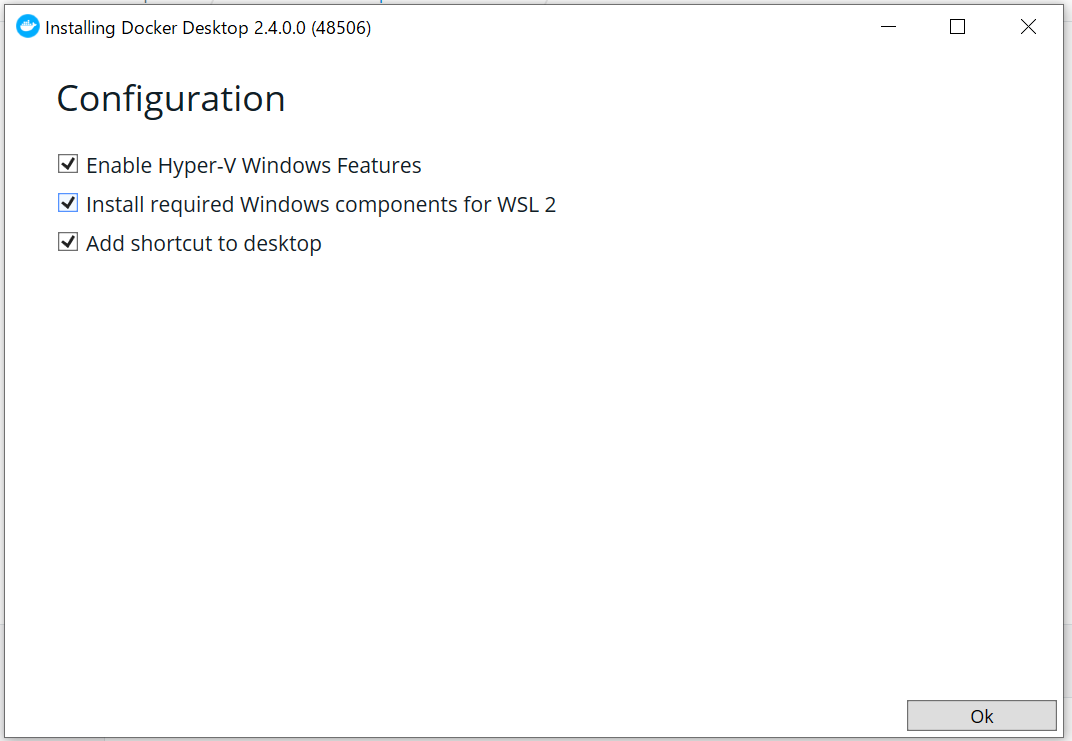
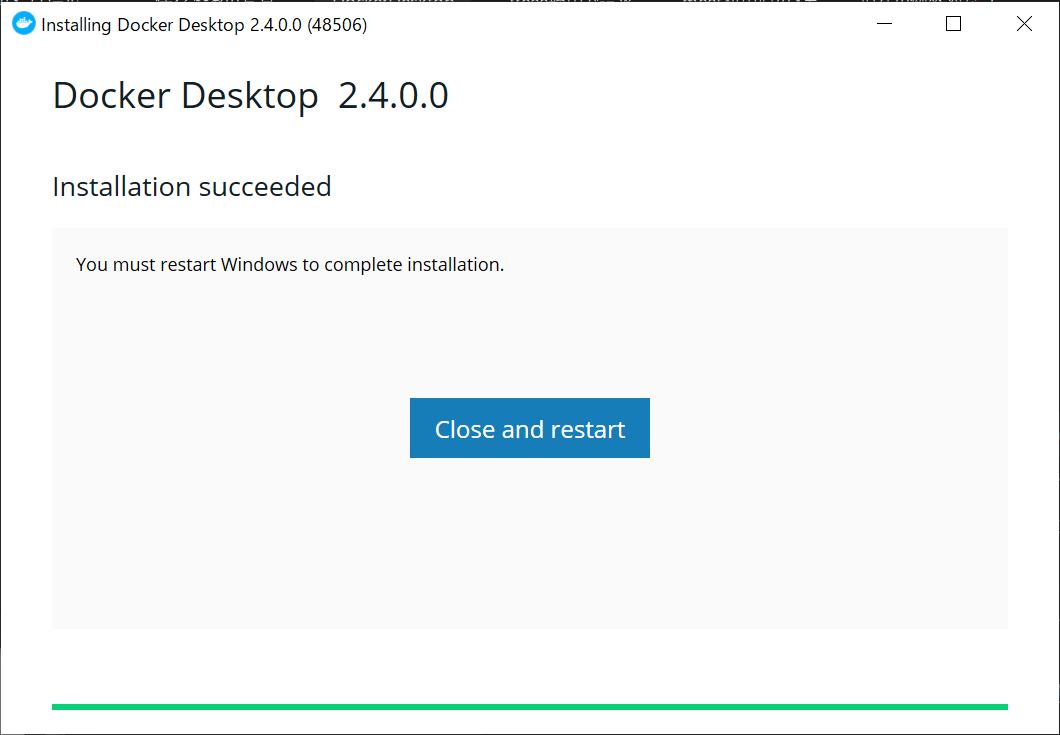
インストールが終わったら、Windows10の再起動が入る。
で、なにをしたらいいのかわからないので、チュートリアルを実施。
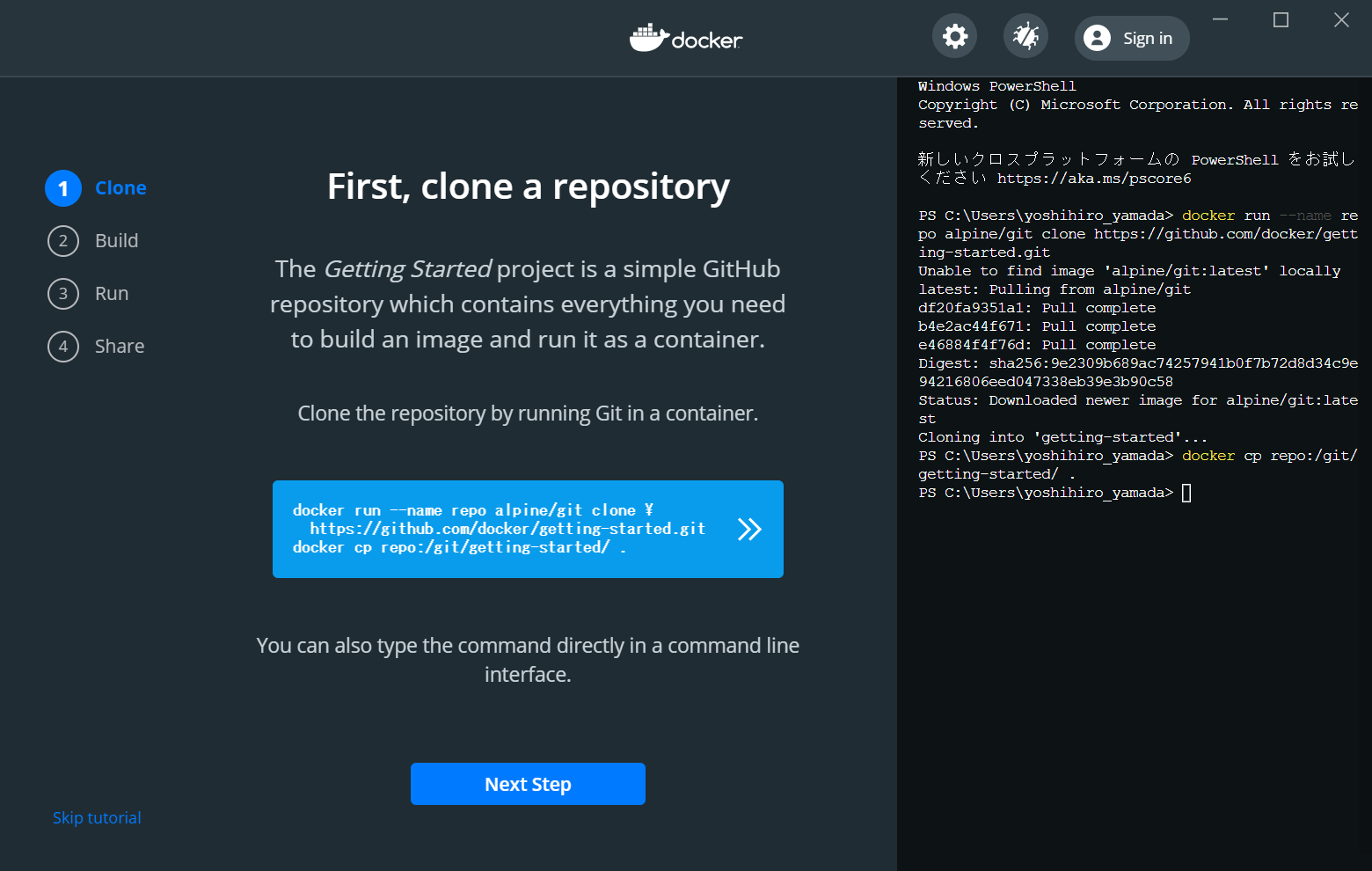
チュートリアルの通りにやったら、チュートリアルのコンテナが立ち上がった。
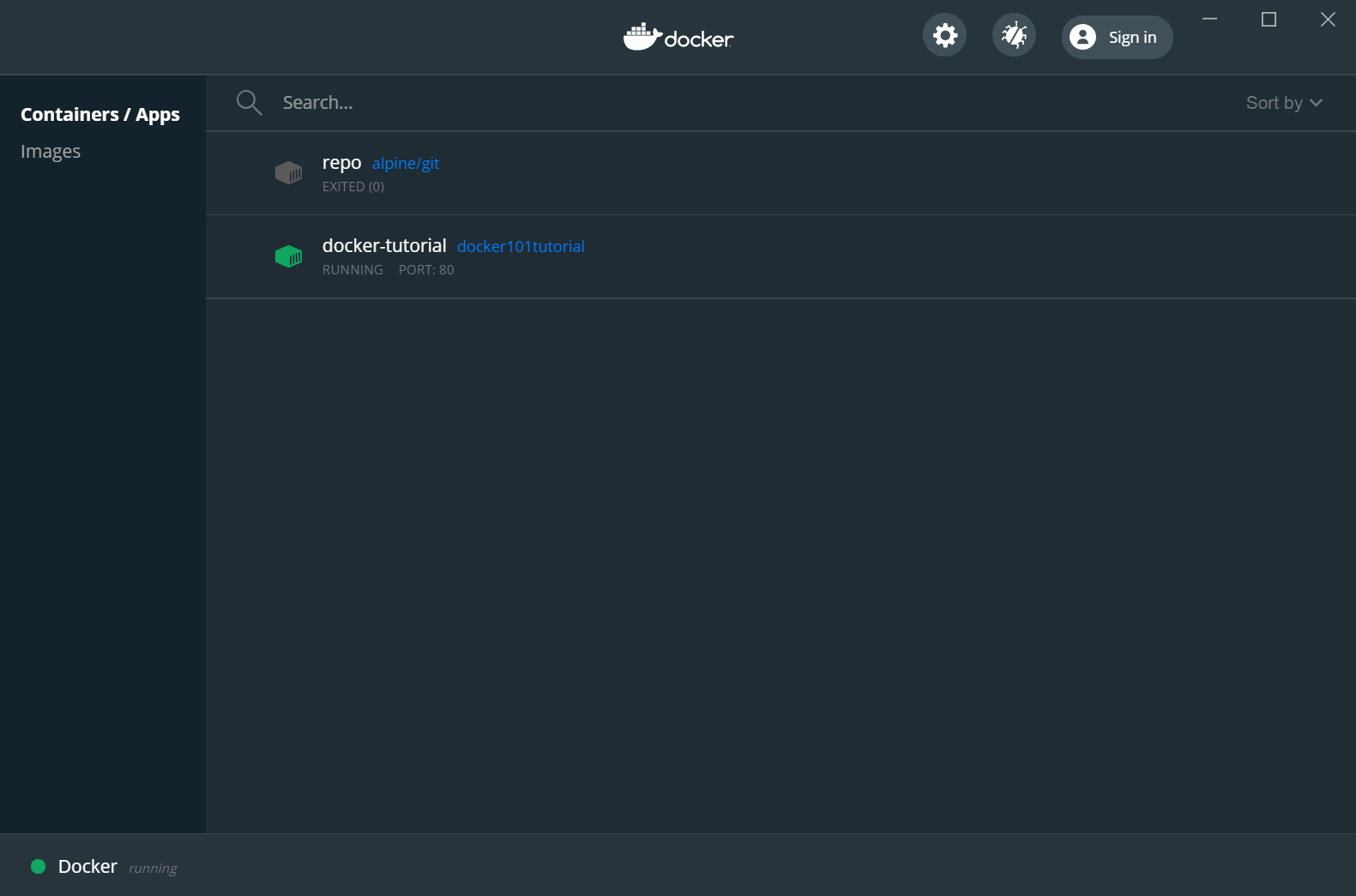
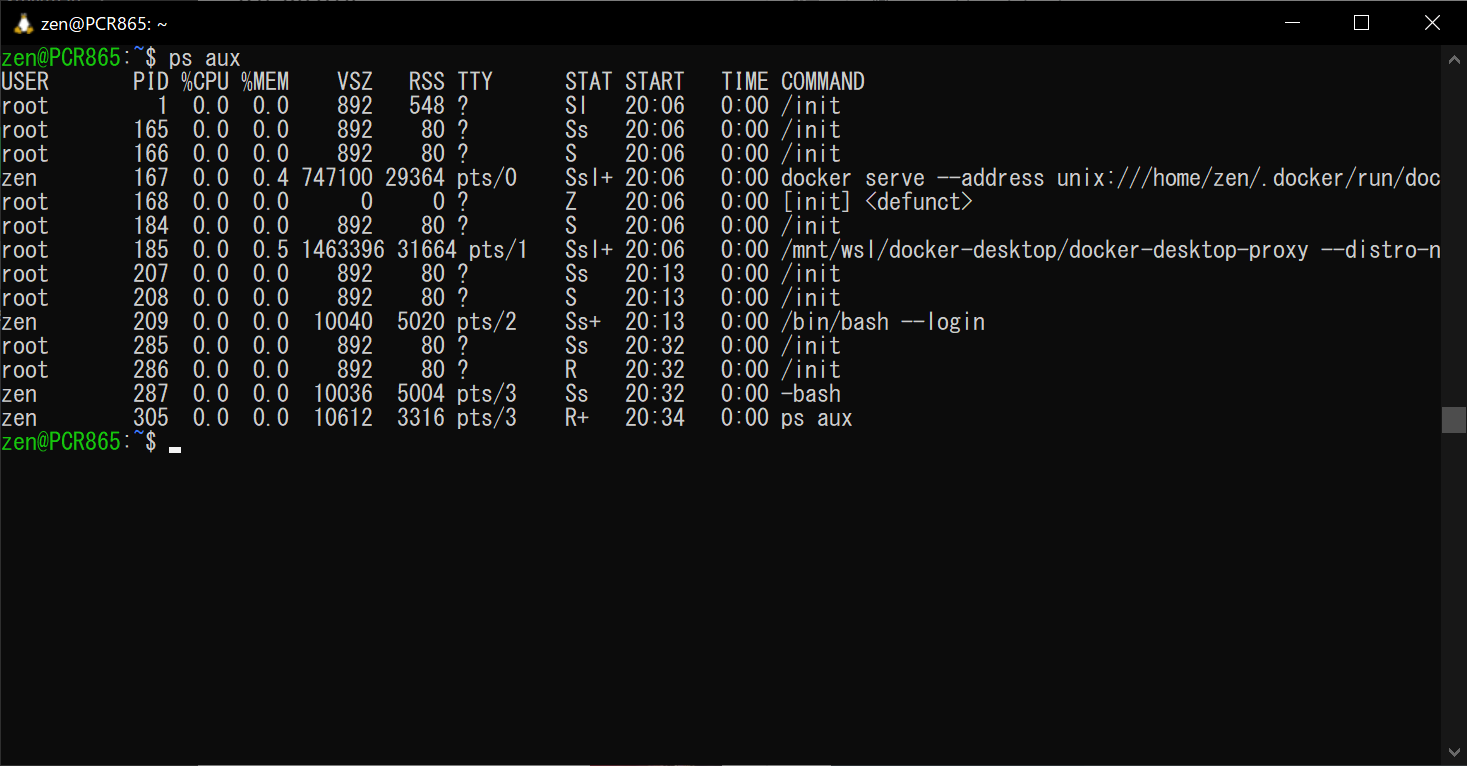
このコンテナがどこで動いているのか気になって、WSL2のUbuntuでpsコマンドをたたいてみると、dockerに関連したプロセスが起動しているので、WSL2の上で動作していることが確認できた。
root 185 0.0 0.5 1463396 31664 pts/1 Ssl+ 20:06 0:00 /mnt/wsl/docker-desktop/docker-desktop-proxy --distro-n
Dockerのインストールというかセットアップが簡単すぎて、正直よくわからない。利用する側にしてみると、どのみちブラックボックスなので、このくらい簡単なのがいいのだろう。

今日(2020/10/13)も、オスの成虫が1匹生存中。最後1匹。過去最長の10月の半ばまで生きている。この個体は、8月の頭に捕まえたワイルド個体だったはず。このまま越冬したら、かなりレア。ただ、今週の冷え込みで、かなり元気がないので、つらいのかも。

それから、飼育容器を変えるために、幼虫の掘り起こしもしてみたが、この時期にしては、とても小さい。冬になると成長が止まるので、秋の間に大きくなってほしいのだが大丈夫だろうか。いろいろと初体験な感じだ。


今日のランチは、赤坂のステーキ五郎で150グラム。野菜などは普通。
最初、外に出た時は、魚を食べるつもりで赤坂をふらふらしていた。どこで魚を食べようか迷いつつ歩いているうちに決められず、気がついたら肉になっていた。魚よりもステーキの方が安いのがいけない。
スープもご飯もおかわり自由だが、ご飯は少なめ。ずっともやしを食べていた。たまに肉。ステーキを主で食べているのか、もやしを主で食べいるのか、途中で分からなくなった。2回目だが、この量の野菜というかもやしを食べると、ご飯は少なめでも満足。野菜をマシにしたら、ご飯はいらないんじゃないかと思うほど。マシにしたときに、野菜を食べきれるのだろうか、という別の不安はあるけれど。